Xfinity Takes the Guesswork Out of Watching Live Sports
Calm the game search chaos by using Xfinity's services and perks

Feb 6, 2026 | Share 


Sponsored
This article is sponsored by Xfinity.
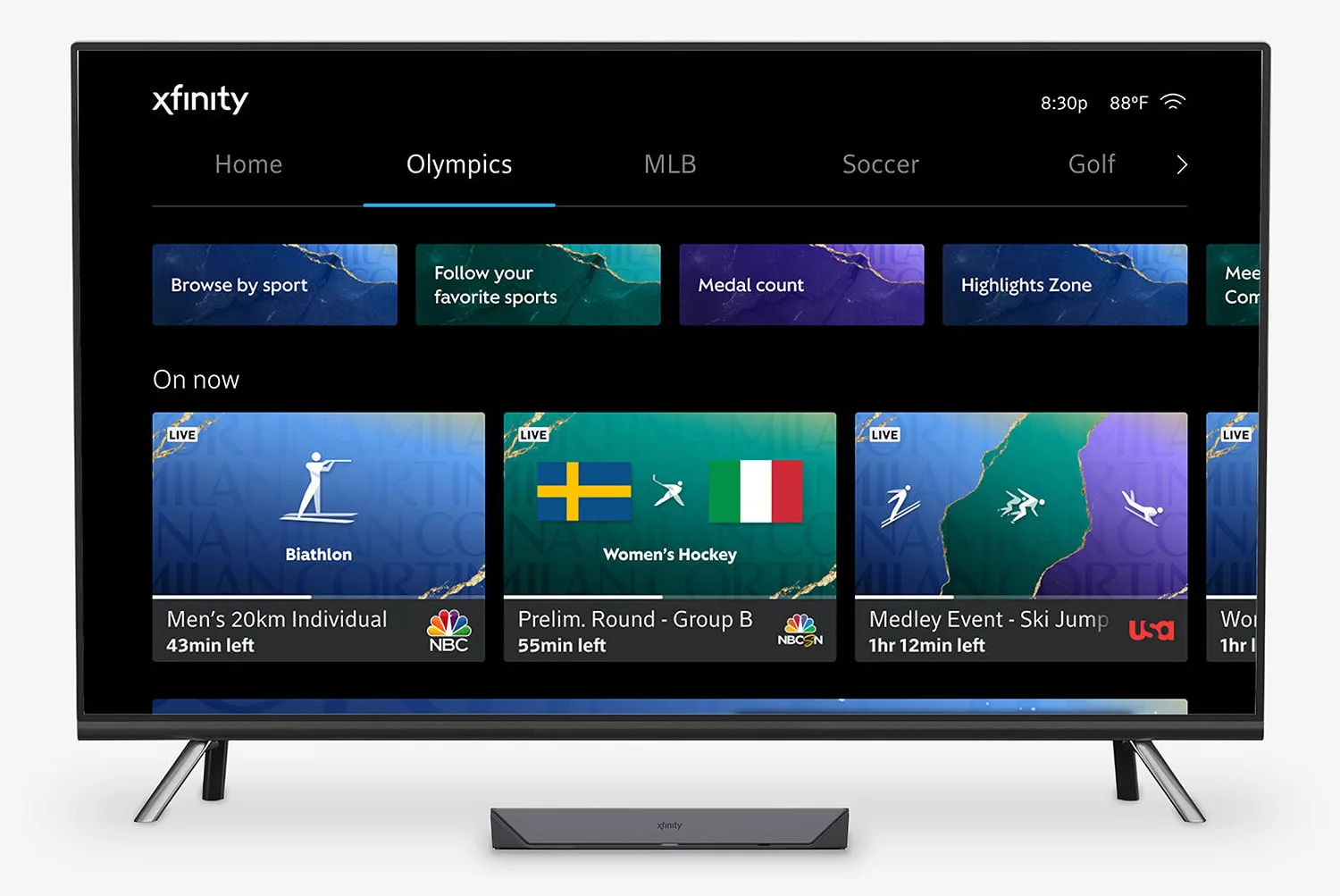
Image courtesy of Xfinity.
There’s a lot to watch just in the first quarter of 2026. The Winter Olympic Games. Super Bowl LX. The NBA All-Star Game. The Winter Paralympic Games. Whew!
If you’re feeling overwhelmed about where and how to watch, Xfinity has your back. Between fast speeds and numerous ways to tune in to every sporting event under the sun, there’s no question that Xfinity is your go-to internet service for streaming live sports events.
Read on to find out why Xfinity is your best bet for everything sports-related.
Xfinity has the speeds you need
You’ve probably seen Xfinity positioned as a major sponsor for sporting events, like on Bubba Wallace’s No. 23 Toyota Camry XSE. Xfinity is also backing 11 athletes in the 2026 Winter Olympics and donating $2,026 each to hundreds of Team USA athletes so they can stay connected to friends and family while in Italy.
Xfinity is one of the largest cable internet providers in the nation. It has the fastest cable internet speeds based on our 2025 data, surpassing rivals like Cox and Spectrum. Take a look at what Xfinity offers nationwide:
| Plan | Price | Download speed |
|---|---|---|
| 300 Mbps | $40/mo.* for 12 mos. | Up to 300Mbps |
| 500 Mbps | $55/mo.* for 12 mos. | Up to 500Mbps |
| 1 Gig | $70/mo.* for 12 mos. | Up to 1,000Mbps |
| 1.2 Gig | $100/mo.* for 12 mos. | Up to 1,200Mbps |
| 2 Gig | $100/mo.* for 12 mos. | Up to 2,000Mbps |
Data as of 09/19/2025. Availability and speed may vary by location, and prices are subject to change.
* For 12 months, no term contract. Restrictions apply. Autopay w/ stored bank account and paperless billing req’d. Taxes and fees extra and subj. to change. Data thresholds may vary.
Every plan includes two years of Peacock Premium, home of the Winter Olympics, at no extra cost, a $10.99 per month value. You also get one line of Xfinity Unlimited for one year—no activation fee required. Plus, there are no contracts to sign, no data caps, and no equipment fees to worry about, so you can focus on tuning in to your favorite sports teams and live events.
Want a better long-term pricing deal? Xfinity also offers five-year price guarantees for a slightly higher price each month, but the long-term savings stack up.

Check out Xfinity’s current deals

- Enjoy a 5-year price guarantee on a 300Mbps internet plan for $40 per month, through Feb. 22
- Get a 5-year price guarantee on the 1 Gig internet plan for $50 per month, through Feb. 22
- Earn up to $500 per year by referring friends to Xfinity
- Get automatic enrollment in Xfinity Rewards for exclusive access to merch, free TV and movies, and rotating weekly offers
See deal disclaimers.
Here’s what you need to stream live sports with Xfinity
First, here are the ways you can watch live sports using Xfinity Internet and TV services:
| TV | |
| X1 Specific | |
| Mobile | |
| Computer |
The best Wi-Fi experience, regardless of your home hardware
The latest Xfinity Advanced Gateway (XB10) is your best bet for interruption-free live sports streaming. It’s based on the latest Wi-Fi 7 specification, offering incredible wireless speeds and reliability. But you don’t need Wi-Fi 7 devices to use it—you’ll still see slightly improved speeds and reliability using Wi-Fi 6E and older devices, based on our tests. Wi-Fi 7 is simply better at reducing interference, which can slow down your wireless speeds and disrupt your live streaming.
The previous XB8 model is also ideal for streaming live sports events if the XB10 isn’t available, especially if you own Wi-Fi 6E devices, like tablets, smartphones, and laptops. It includes the new 6 GHz band (as do most Wi-Fi 7 products), offering a new Wi-Fi landscape free of all the disrupting congestion plaguing the 5 GHz and 2.4 GHz bands—congestion that can bring your livestreams to an abrupt halt.
Four gateway placement rules for better home internet
Where your Xfinity gateway is located squarely depends on the physical internet connection coming into your home. You normally can’t relocate it to another room without calling a technician. Hopefully, it was installed in the best spot.
However, there are a few things you can do to optimize your Wi-Fi connection. Make sure the gateway is:
- A few feet off the floor
- Not stuffed into a corner
- Not parked next to large furniture, like between bookcases
- Not parked next to a “noisy” appliance, like a microwave
Remember, live TV is less forgiving than streaming video
Having a strong Wi-Fi connection is crucial if you’re watching any live event on a wireless device.
Normal video streaming, like watching movies and TV shows on Netflix, downloads video in chunks. While you’re watching one downloaded chunk, the application receives another chunk from a Netflix server. Buffering pauses your playback because the next chunk hasn’t been delivered to your device.
Meanwhile, pixilation happens when video quality drops due to congestion. Chunks get lost or delayed during the transmission, thanks to a traffic jam on the internet or in your home. Neighboring Wi-Fi interference can also cause pixilation.
Live TV is somewhat different. Content isn’t stored in the cloud—it’s broadcast in real time. Pixilation can be a nuisance visually, but if the stream stops for any reason, you’ll miss the action. Having a strong Wi-Fi connection helps reduce any possible pixilation and disconnects on your end.

Can you get Xfinity Internet where you live?
Enter your zip code to see if Xfinity provides internet and TV in your area.
Get the most live sports through Xfinity TV
Xfinity provides different cable TV plans, but three stand out as the best for watching live TV. Take a look:
Ideal TV plans for live sports programming
| Package | Price | Channels |
|---|---|---|
| Sports & News TV* | $80/mo. | 50+ |
| TV Plus | $95/mo. | 125+ |
| TV Premium | $125/mo. | 185+ |
* Peacock Premium included with Sports & News TV
If you’re new to Xfinity, here are some suggested TV and internet bundles catered to sports:
Suggested TV and internet bundles
| Package | Price | Download speed | Channels |
|---|---|---|---|
| 300 Mbps + Sports & News TV | Up to $90/mo.* | Up to 300Mbps | 50+ |
| 500 Mbps + Sports & News TV | Up to $105/mo.* | Up to 500Mbps | 50+ |
| 1 Gig + Sports & News TV | Up to $120/mo.* | Up to 1,000Mbps | 50+ |
| 2 Gig + Sports & News TV | Up to $150/mo.* | Up to 2,000Mbps | 50+ |
* Price Includes $10/mo multi-product discount with Xfinity Internet. No term contract. Broadcast TV fee extra; price subj to change. Taxes and equipment not included.
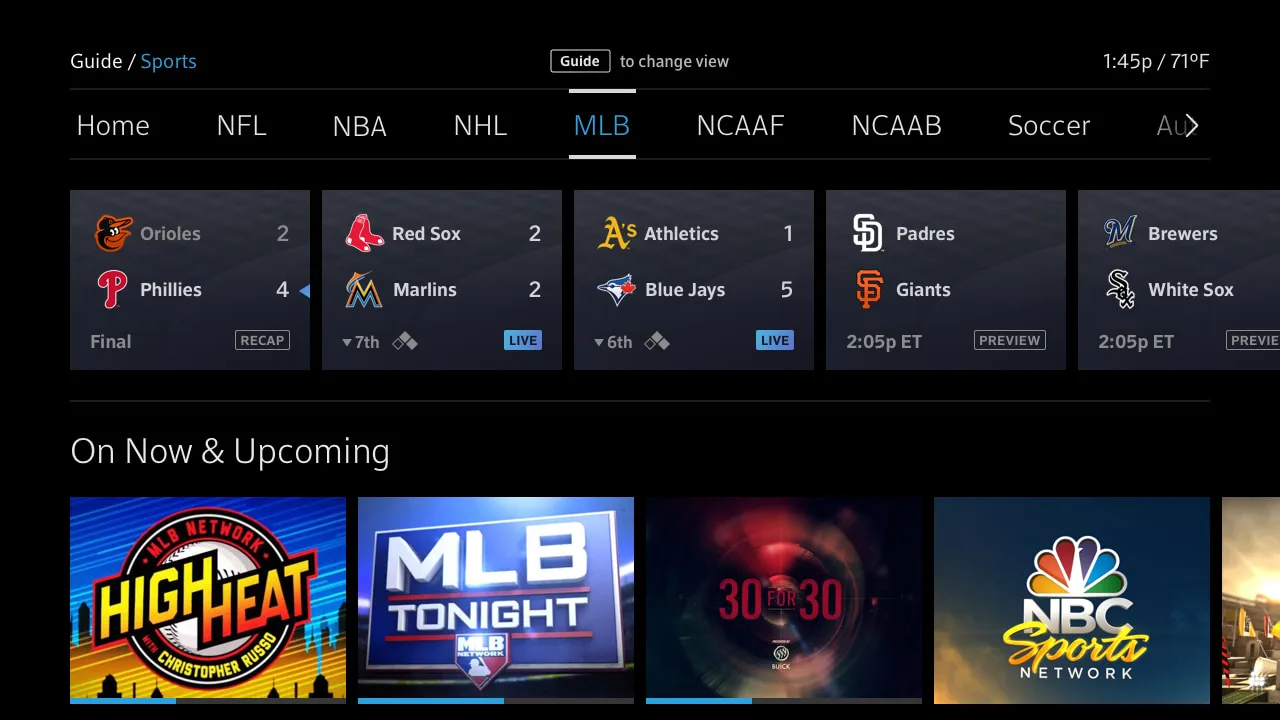
Image courtesy of Xfinity.
Find games fast with Sports Destination and Sports Zone
The Xfinity X1 set-top box includes Sports Destination, your exclusive all-in-one hub for discovering live sports events, current and upcoming sports programs, news, and more. Everything available to you is listed on the Home screen, or you can select tabs to view specific sports leagues, like the NBA or MLB. Plus, users can customize and see a curated view of their favorite teams.
Other perks associated with Sports Destination include the Xfinity Odds Zone, which displays odds provided by popular sportsbooks in an overlay. The X1 Voice Remote is handy, too, for loading content based on a sports team or other programming prompt you speak (or scream if you’re super-excited about it). Eager to watch the Winter Olympic Games? There’s a special tab for that, too.
However, the sports content you see squarely depends on your channel lineup. If you’re missing events, then it might be time to upgrade to a new Xfinity TV plan.
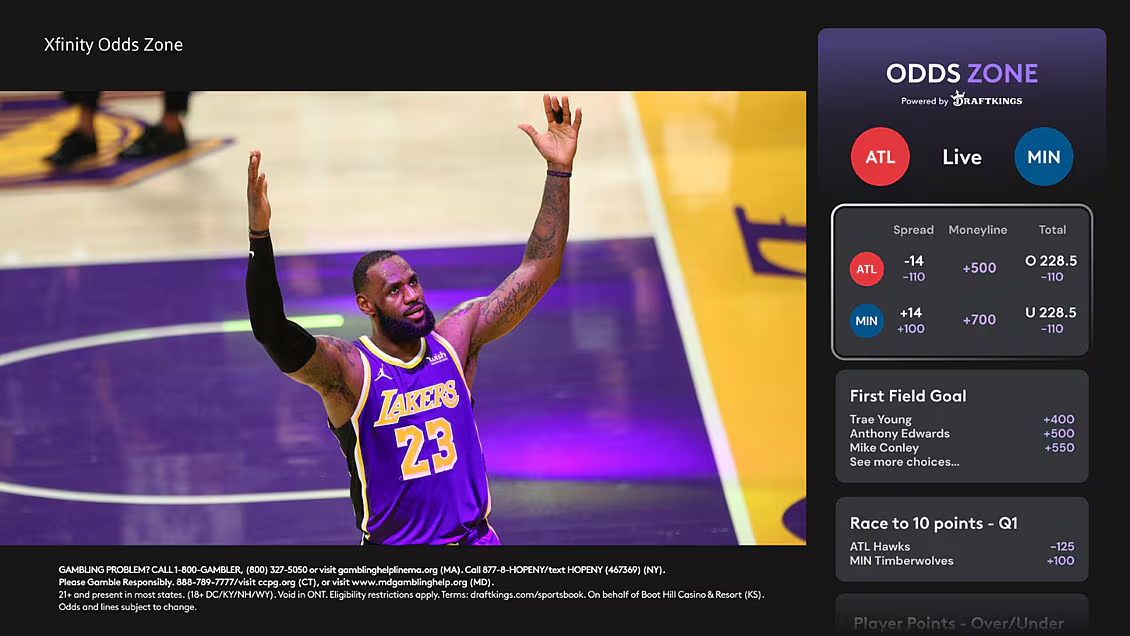
Image courtesy of Xfinity.
The X1 Sports Zone app is a great alternative
The Xfinity X1 Sports Zone app is similar to Sports Destination but serves a different purpose. It combines all the sports content pulled from your TV channels along with the streaming apps you have installed on your X1 set-top box. It also supports the Xfinity Voice Remote, allowing you to open the app and search content using a voice command.
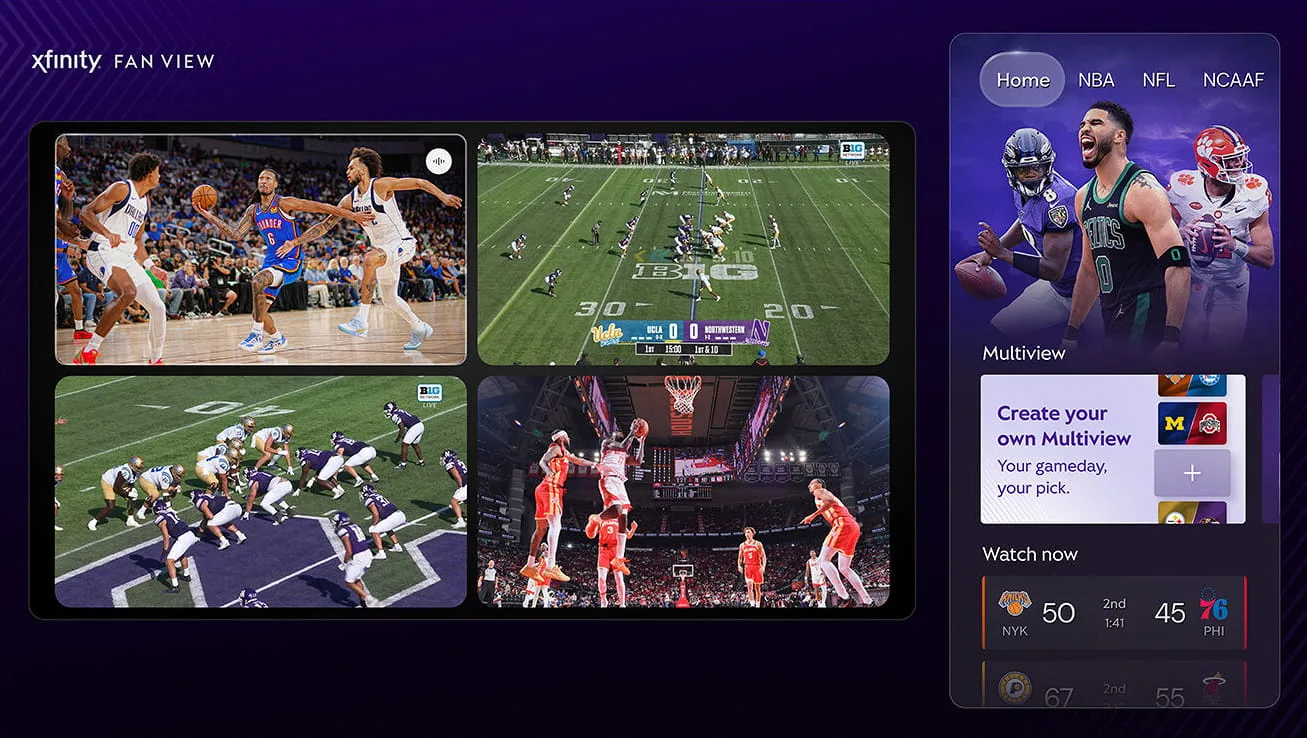
Image courtesy of Xfinity.
Both support Xfinity Multiview
Why settle for watching one game when you can view up to four events on a single screen? You can even zoom in on any one of the views without exiting the Multiview mode. It works with Fan View, which provides odds, live scores, and more.
Xfinity Multiview is best used with X1 set-top boxes that support 4K video—you’ll need a compatible 4K TV, as well. It also works with eligible 2K Xfinity TV devices, but users may experience longer load times when adding a third and fourth feed.
Watch live sports anywhere with Xfinity Stream
Xfinity Stream complements your TV viewing experience. You can watch the same content on any mobile device you own, whether it’s a smartphone, tablet, or laptop. That means you can watch your favorite live events from your pink flamingo raft, out on the front porch, on top of the roof—you name it, and Xfinity has you covered.
If you don’t lease TV equipment from Xfinity, you can install the app on select Smart TVs and set-top boxes, including:
- Amazon Fire TV
- Amazon Fire TV Stick
- Apple TV*
- LG TV*
- Roku*
- Samsung*
- Xfinity Flex*
- Xumo Stream Box
- Xumo TV*
* Currently only available in-home and only to Xfinity TV customers with Internet
Some live events may be unavailable
Keep in mind that some live events won’t be available to you because:
- Your TV plan doesn’t include the channel.
- The event is not made available at your location.
While the latter restriction is out of your hands (unless you use a VPN), consider switching Xfinity TV plans if you lack the channels you need to watch specific live events. Plans start at $80 a month for 50+ channels.
Xfinity is your go-to internet provider for sports
As we’ve shown, there’s a lot to love with Xfinity if you’re a sports fanatic. You get exclusive sports curators to make finding content super easy, great and reliable internet speeds backed by the latest Wi-Fi specification, and plenty of ways to watch your favorite live events.
But don’t take our word for it. Give Xfinity a try. You can cancel service within the first 30 days and get a refund.
Disclaimers
300 Mbps Internet 5-year deal
Offer ends 2/22/2026. Restrictions apply. Autopay w/ stored bank account and paperless billing req’d. Taxes and fees extra and subj. to change. Save $500+ over 5 years with our 5 year pricing vs. our 1 year pricing for 300 Mbps internet. Mobile: Reduced speeds after 30 GB of usage/line. Data thresholds may vary. Xfinity Mobile req’s Xfinity Int.
1 Gig Internet 5-year deal
Offer ends 2/22/2026. Restrictions apply. Autopay w/ stored bank account and paperless billing req’d. Taxes and fees extra and subj. to change. Save $500+ over 5 years with our 5 year pricing vs. our 1 year pricing for 300 Mbps internet. Mobile: Reduced speeds after 30 GB of usage/line. Data thresholds may vary. Xfinity Mobile req’s Xfinity Int.
Author - Kevin Parrish
Kevin Parrish has more than a decade of experience working as a writer, editor, and product tester. He began writing about computer hardware and soon branched out to other devices and services such as networking equipment, phones and tablets, game consoles, and other internet-connected devices. His work has appeared in Tom’s Hardware, Tom's Guide, Maximum PC, Digital Trends, Android Authority, How-To Geek, Lifewire, and others. At HighSpeedInternet.com, he focuses on network equipment testing and review.
Editor - Jessica Brooksby
Jessica loves bringing her passion for the written word and her love of tech into one space at HighSpeedInternet.com. She works with the team’s writers to revise strong, user-focused content so every reader can find the tech that works for them. Jessica has a bachelor’s degree in English from Utah Valley University and seven years of creative and editorial experience. Outside of work, she spends her time gaming, reading, painting, and buying an excessive amount of Legend of Zelda merchandise.
Related Posts