TP-Link Archer GE400 Review
A decent Wi-Fi upgrade for gamers on a budget

Jan 20, 2026 | Share 


Equipment Guides, Product Reviews, Router Reviews
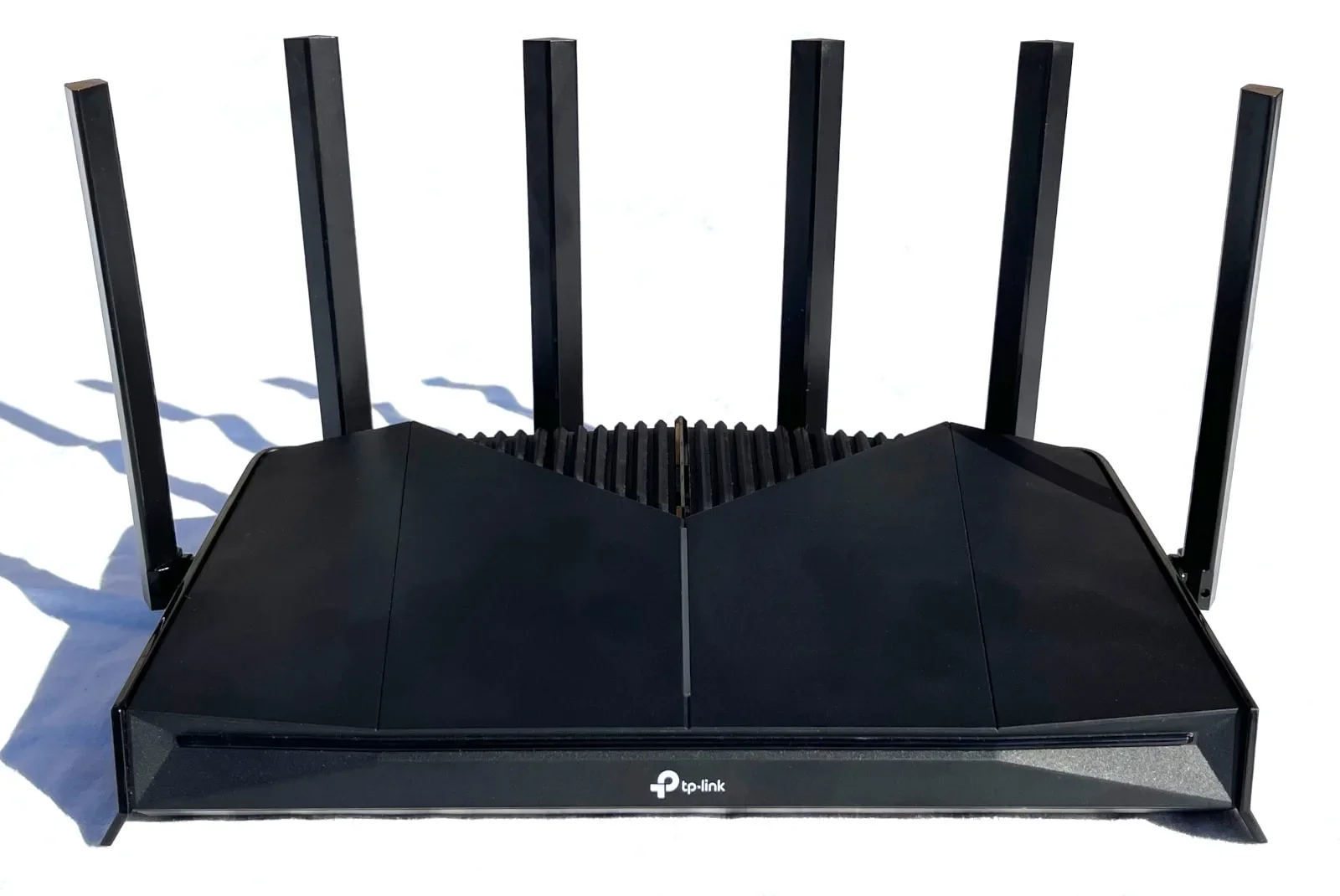
The TP-Link Archer GE400 is a great router for gamers on a budget. Kevin Parrish | HighSpeedInternet.com
Price: $219.99 on Amazon*
Our score
(4/5)Specs:
- Up to 688Mbps (2.4 GHz)
- Up to 5,764Mbps (5 GHz)
- 3x Gigabit Ethernet ports
- 2x 2.5 Gigabit Ethernet ports
- 1x USB ports
Max internet speed:
- 2,350Mbps
*Amazon.com price (as of 1/12/26 17:35 MST). See disclaimer.
The TP-Link Archer GE400 is ideal for gamers on a tight budget who want a network upgrade but don’t have Wi-Fi 7 devices. Sure, there are a few unique gaming tools thrown under the hood along with a nifty RGB strip for a little blingy bling, but the real benefit here is how Wi-Fi 7 handles interference and improves the throughput for Wi-Fi 6E and older devices.
If you decide to purchase this router, you can always get a more robust TP-Link gaming router later on and keep this one as an access point for an EasyMesh Wi-Fi network. Let’s take a look at what the Archer GE400 has to offer to see if it’s the right Wi-Fi 7 router for you.
Pros
 Fast 5 GHz speeds
Some unique gaming tools
EasyMesh support
Cons
 No 6 GHz band
No 10Gbps wired connectivity
Subscription-locked features
In this review:
Standout features | Competitor comparisons | Scoring breakdown | The verdict | FAQ | Methodology
In this review:
Archer GE400 standout features
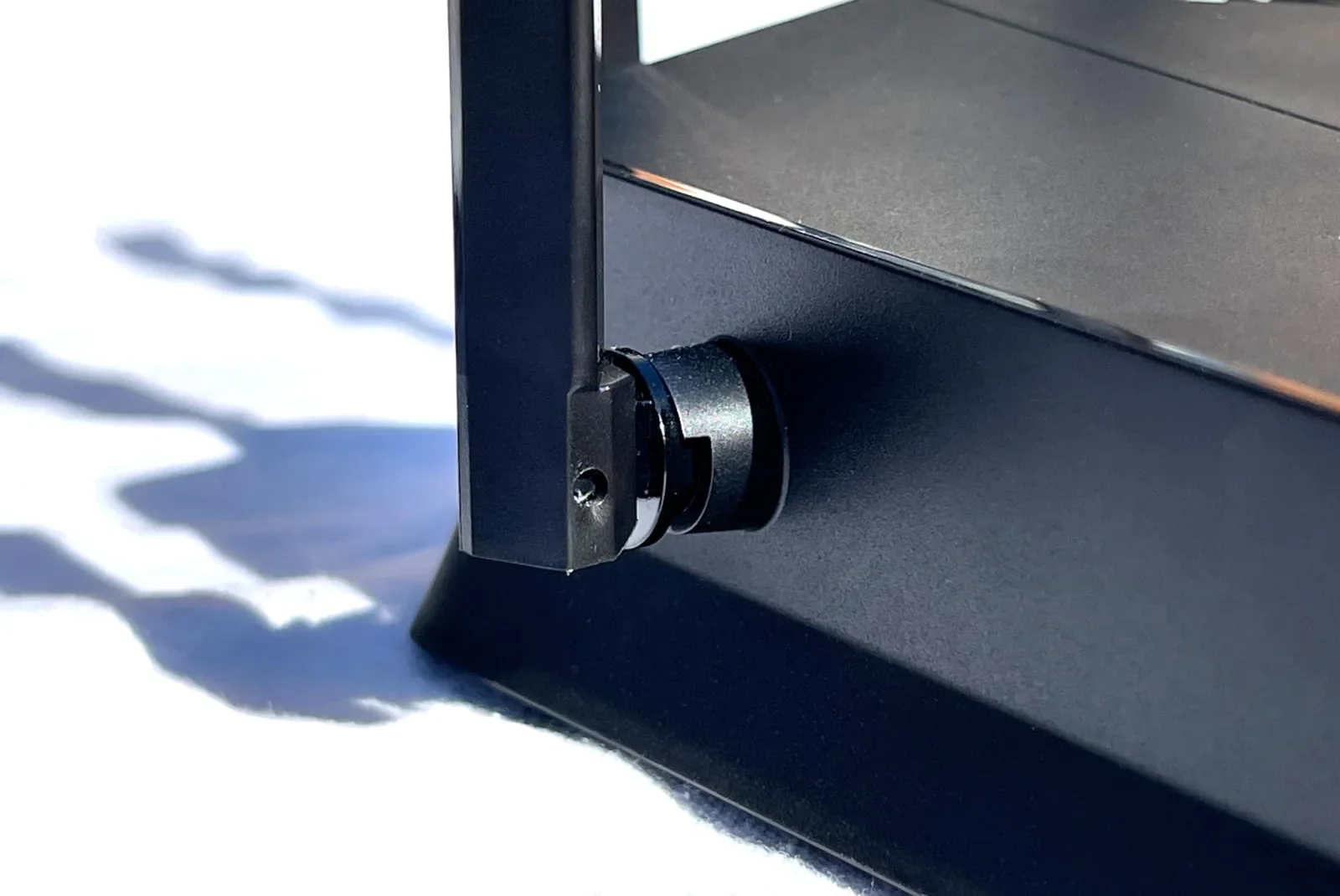
The TP-Link Archer GE400 antennas aren’t removable, but you can rotate them in any direction. Kevin Parrish | HighSpeedInternet.com
The Archer GE400 isn’t just some basic, budget router with “gaming” slapped on the label: There are some gaming tools baked in along with a nifty RGB strip you can customize. You get some decent non-gaming features for the price, too, while more advanced options like antivirus and flexible bedtime management require a subscription.
The best features at a glance
Some unique gaming tools
VPN tools
Basic parental controls
Compare the Archer GE400 to the competition
| Product | Max throughput | Tested speed @ 40 ft.* | Price† |
|---|---|---|---|
| TP-Link Archer GE400 | 6,500Mbps | 1,581Mbps | $219.99 on Amazon |
| TP-Link Archer BE230 | 3,600Mbps | 1,327Mbps | $86.98 on Amazon |
| NETGEAR Nighthawk RS200 | 6,500Mbps | 1,529Mbps | $199.99 on Amazon |
* Speed recorded using a Wi-Fi 7 client and a 160 MHz channel.
† Amazon.com prices (as of 1/12/26 11:32 MST). See disclaimer.
Although I’ve tested other Wi-Fi 7 routers, I decided to compare similar ones to keep things fair. All three listed above don’t include the 6 GHz band, and you may be asking why not, given that’s where you get most of the glorious Wi-Fi 7 speed. A third radio would increase the price, and these routers prioritize affordability. Plus, they likely target the crowd looking to upgrade from an older router but don’t have Wi-Fi 7 devices just yet.
That said, the Archer GE400 is the only one of the three intended for gamers. But like the others, you need subscriptions to get everything it offers, like advanced parental controls and antivirus support. The NETGEAR model has link aggregation, whereas the GE400 does not. Meanwhile, the GE400 has a built-in VPN client and supports mesh networking, whereas the Nighthawk RS200 does not.
Archer GE400 scoring breakdown
| Category | Score* | Summary |
| Performance | 4 | Dishes out some of the fastest 5 GHz speeds I’ve tested |
| Features | 4 | Includes gaming and VPN tools at no extra cost |
| Design | 4 | Provides 2.5Gbps wired connectivity |
| Setup | 5 | Gets your network up and running insanely fast |
| Ease of use | 4 | Presents a great web UI and mobile app experience |
* out of 5 points
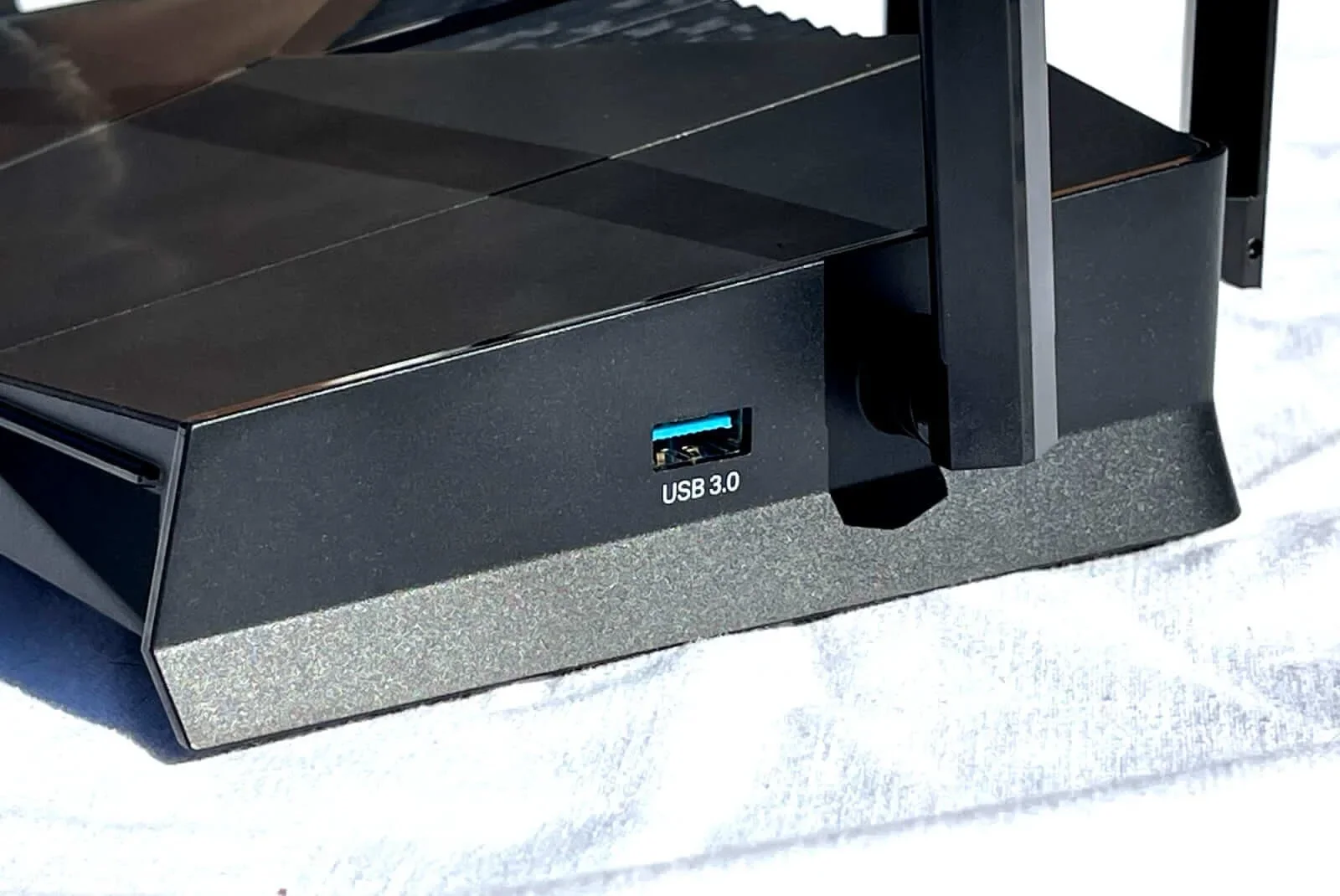
The USB port on the TP-Link Archer GE400 is limited to file sharing. Kevin Parrish | HighSpeedInternet.com
Performance
4
Wi-Fi configuration
- 4 GHz band: 688Mbps (2 x 344Mbps)*
- 5 GHz band: 5,764Mbps (4 x 1,441Mbps)†
* Using a 40 MHz channel width
† Using a 160 MHz channel width
I generally say Wi-Fi 7 does an excellent job of handling interference. I’ve seen a noticeable improvement in speed when I benchmark Wi-Fi 6E and older devices—especially when I use DFS channels on the 5 GHz band. But this router is determined to paint me as a dirty rotten liar, as you’ll see when I get to the 2.4 GHz tests.
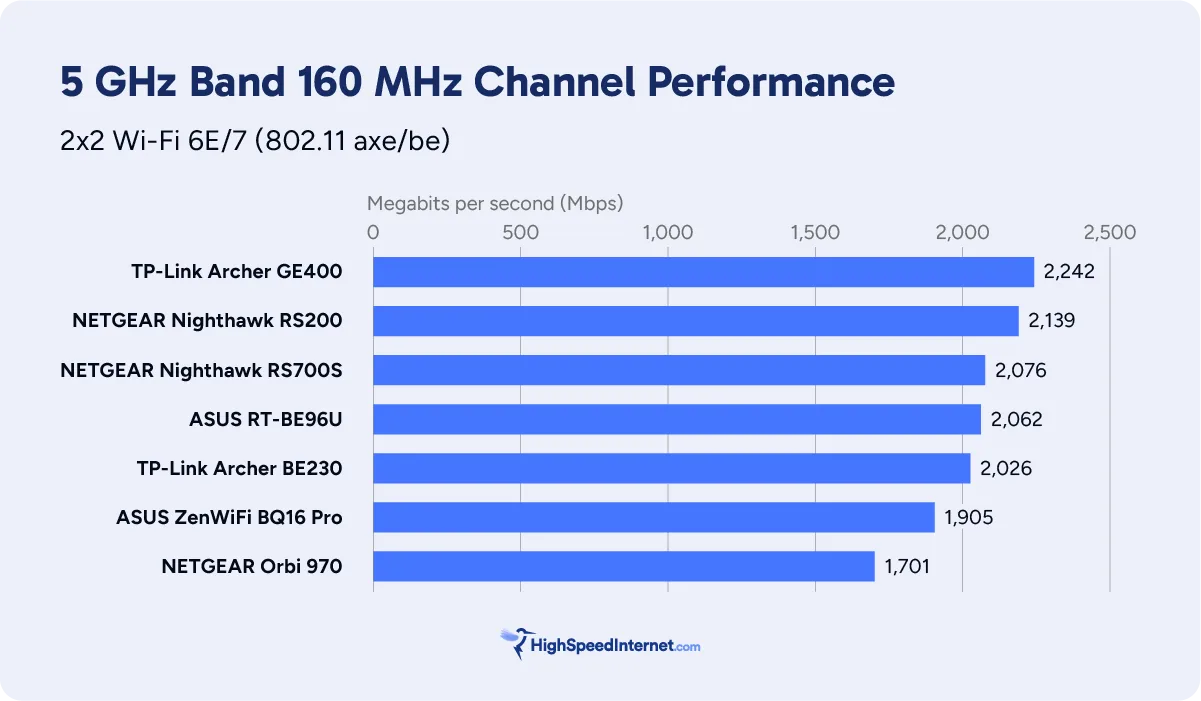
For starters, the connection speed always depends on the server-client relationship—how they communicate with each other and deal with the environment. There can be some radio incompatibility between them that will thwart your speeds—I’ve seen it plenty of times in testing.
In this case, my Wi-Fi 7 client registered the fastest speeds on the 5 GHz band since I started testing Wi-Fi 7. Either aliens were involved, interference was crazy low, or my Wi-Fi 7 client really loved the GE400 with wide, heart-shaped eyes. In fact, it clocked 300Mbps more throughput than the other routers at my marker across the street. Umm, say what?
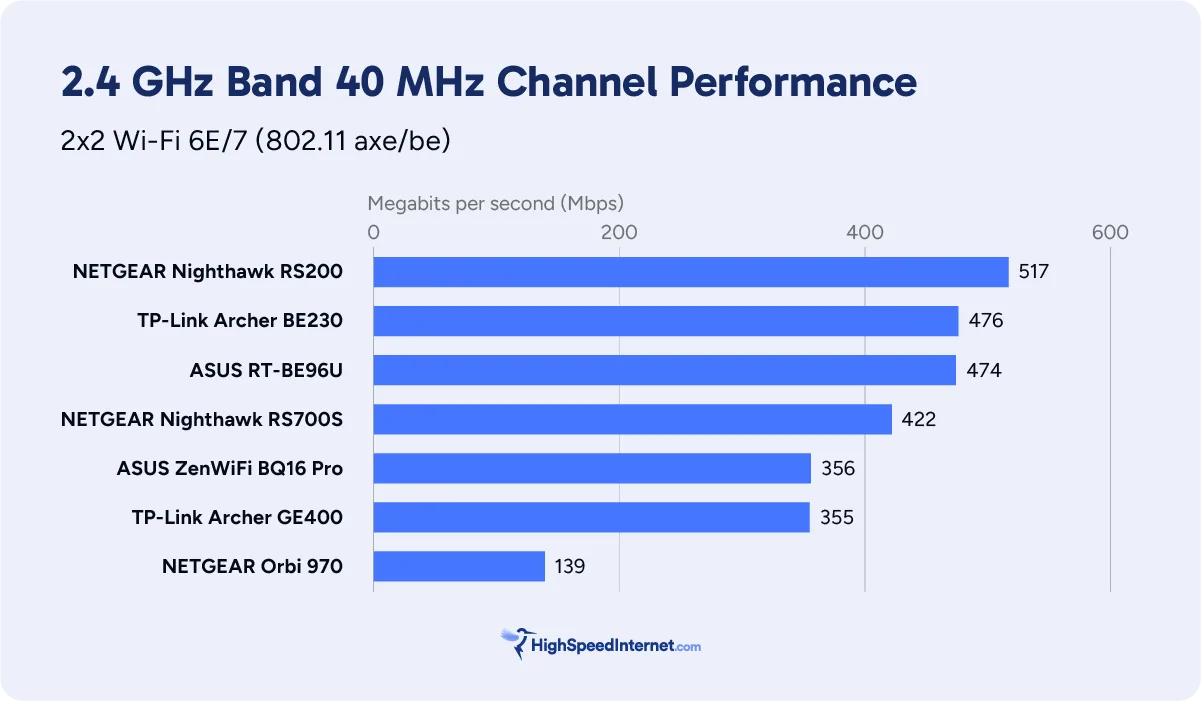
But here’s the ugly flip side. My Wi-Fi 7 client recorded the slowest 2.4 GHz speeds compared to the other standalone Wi-Fi 7 routers I tested. Naturally, I changed channels quite a few times to see if I could squeeze out more throughput, but nope. Nadda. A measly 355Mbps was the best I could muster at close range, versus 476Mbps with the cheaper Archer BE230 model.
Meanwhile, my Wi-Fi 6E client performed normally in testing, showing benchmarks that mostly match all the other Wi-Fi 7 router tests I’ve performed to date. It’s a good example of my compatibility theory—two similar devices, but one performs better than the other.
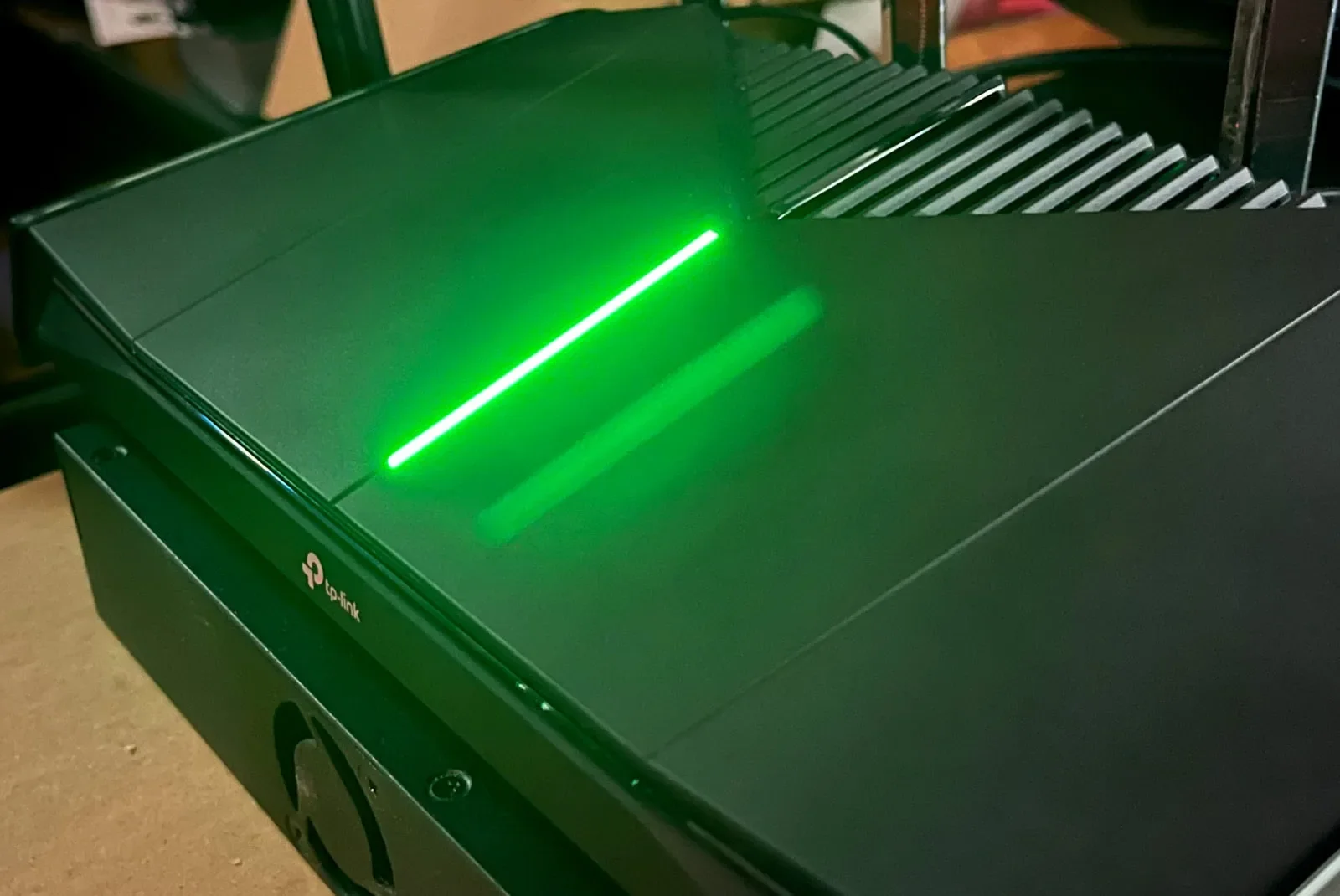
You can customize the RGB strip on the TP-Link Archer GE400, but it automatically shifts to red when there’s a trouble condition. Kevin Parrish | HighSpeedInternet.com
Features
4
Notable features
- Gaming tools
- VPN tools
- Basic parental controls
There are quite a few good things going on with the Archer GE400. You have the built-in VPN tools, EasyMesh support for expanding your Wi-Fi network, support for up to seven different Wi-Fi networks, and a handful of basic parental controls.
On the gaming front, the RGB strip is pretty cool—gamers like that bling, after all—allowing you to choose different effects. The Game Port Forwarding tool contains the port forwarding settings (profiles) of 100 games you can apply to optimize your connection to remote game servers, like Call of Duty 4 and Fortnite. However, everything else in the Game Center is just rebranded settings you’ve seen before, like quality of service, device prioritization, and diagnostic tools.
What the Archer GE400 could do better
- Subscription-free features
- More USB tools
Yes, the Archer GE400 offers some free security and parental control features, but I shouldn’t have to pay for subscriptions to get features offered at no extra cost elsewhere. Either make all features free, or don’t offer them at all. Stop milking the consumer. Take a look at the subscriptions section for more information.
Meanwhile, there doesn’t appear to be a built-in media server, although you can watch videos from a USB storage device. There’s no printer sharing or Apple Time Machine support, either. All you get is basic storage sharing. Snore.
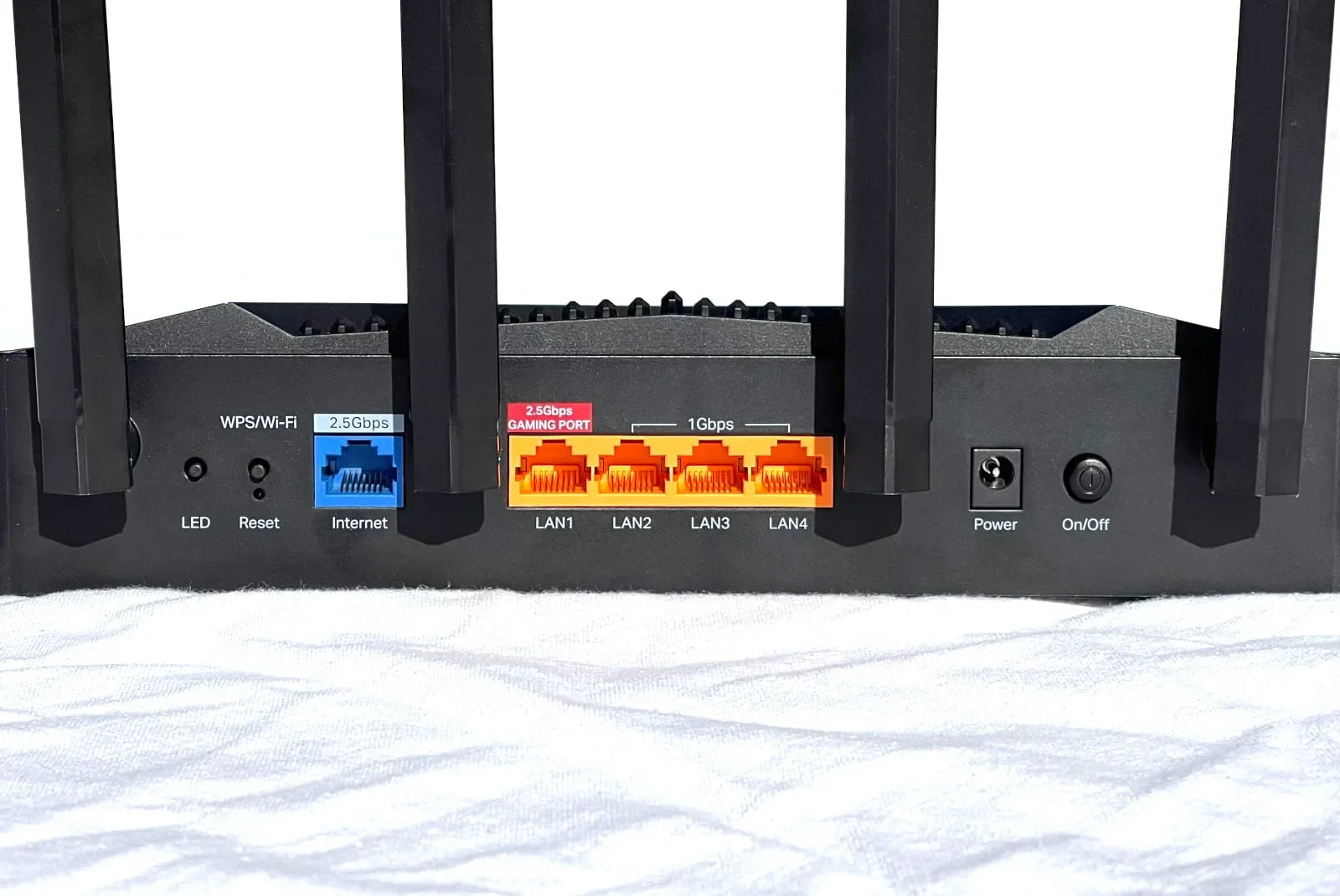
The TP-Link Archer GE400 supports internet plans of up to 2.3Gbps. Kevin Parrish | HighSpeedInternet.com
Design
4
Buttons
- 1x Power button (back)
- 1x Reset button (back)
- 1x LED button (back)
- 1x WPS button (back)
- 1x Wi-Fi button (back)
Internet ports
- 1x 2.5 Gigabit Ethernet WAN port (back)
LAN ports
- 1x 2.5 Gigabit Ethernet LAN port (back)
- 3x Gigabit Ethernet LAN ports (back)
Other ports
- 1x USB 3.2 port (right side)
Design-wise, the Archer GE400 isn’t vastly different from the cheaper Archer BE230. Both have the same ports and number of bands. However, the GE400 adds two extra antennas and two additional spatial streams on the 5 GHz band. In other words, it can handle a few extra simultaneous transmissions than the Archer BE230, increasing its max throughput by 2,900Mbps for $133more.
And since this router doesn’t offer the 6 GHz band and the associated 320 MHz-wide channels, the only real benefit here is the way Wi-Fi 7 routers handle interference. Wi-Fi 6E and older devices clearly benefit from the new spec based on my testing, although you do need a Wi-Fi 7 device if you want to see higher speeds on the 2.4 GHz band.
There’s also no 10Gbps Ethernet port, which seems to be reserved for routers with higher throughputs, like the NETGEAR Nighthawk RS700S and the ASUS RT-BE96U.
Setup
5
Inside the box
- 1x router
- 1x power adapter
- 1x Ethernet cable
- 1x Setup guide
- 1x Regulatory and warranty booklet
After years of complaining about the amount of time required to set up a TP-Link router, the Archer GE400 was surprisingly quick. Gone were the requirements to set the MAC address and IPTV settings during setup, which you can address later if needed. I’m not sure if TP-Link assumes gamers don’t bother with these settings and didn’t include them in the GE400 setup, or if TP-Link removed these steps permanently across the board—I guess we’ll find out in my next TP-Link router review.
Regardless, all that was needed from me was to set the router login password. The only thing I had to do afterwards was set the network names and passwords for each radio. Note that Smart Connect was disabled by default, which usually isn’t the case with most of the standalone routers I’ve tested. That’s a good thing, because the last thing you need is your gaming rig or console using the slow-as-snails 2.4 GHz band during a multiplayer firefight.
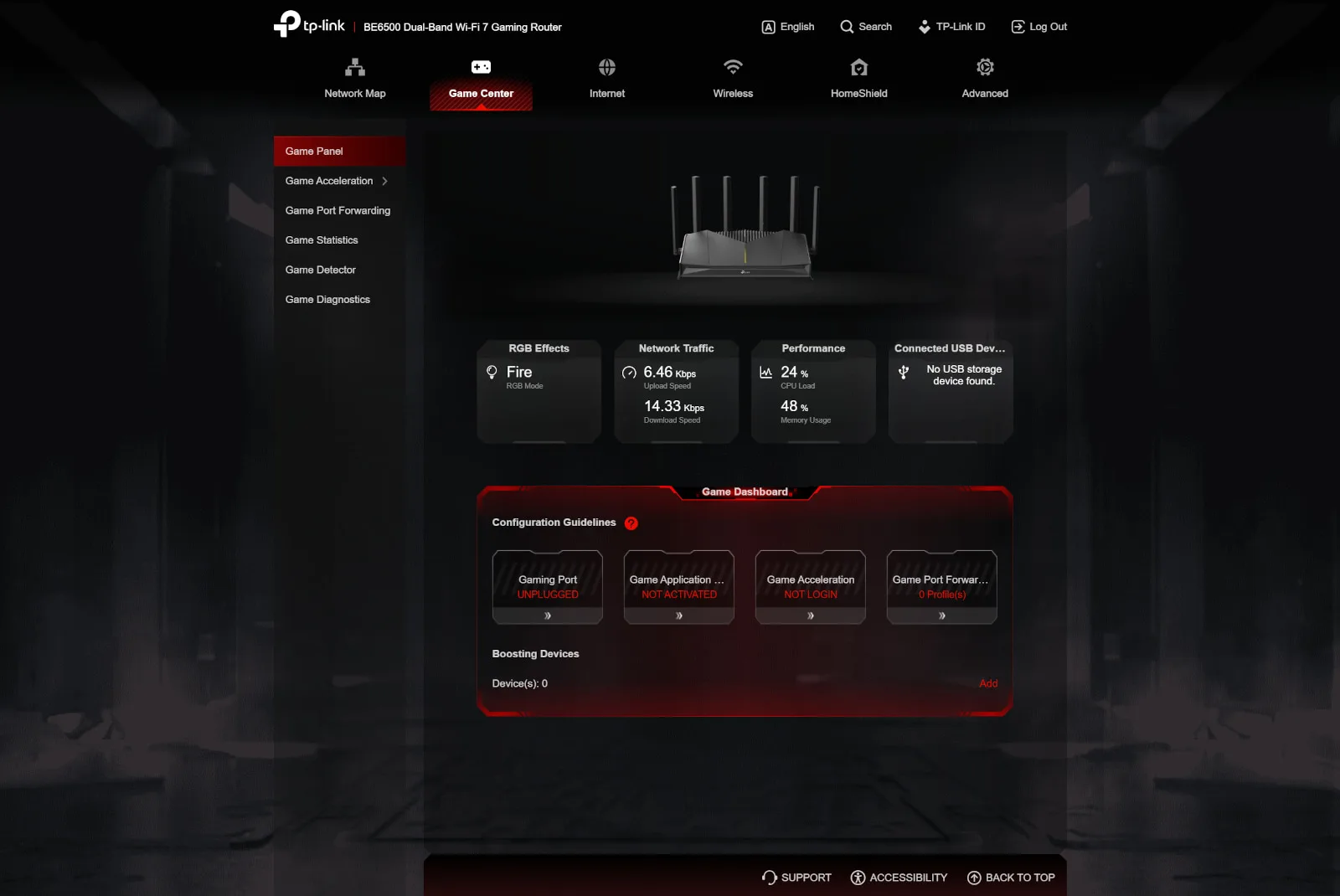
The Archer GE400 has one of the coolest web interfaces I’ve seen from TP-Link to date. Kevin Parrish | HighSpeedInternet.com
Ease of use
4
Router interface
- Web interface:net (192.168.1.1)
- Mobile app: TP-Link Tether (App Store, Google Play)
I prefer dark interfaces, and TP-Link offers just that with its web UI and Tether app for the Archer GE400. White text on black and dark gray backgrounds is less vibrant, making these interfaces easier to use. Plus, I’ve griped about the white/light blue web UI used on TP-Link routers for years, with no option for a dark mode, so the Archer GE400 was a nice change.
To be honest, I prefer the Tether app over the web UI. It uses the screen space more intelligently, presenting nearly everything you need to know at a glance on the home screen versus all the blank, wasted space seen on the web UI’s network map.
Unfortunately, you still need both to manage this router, but the app does provide more enthusiast controls than what I’ve seen in the past, like channel settings. The basic parental controls are the same on both, but for things like app restrictions and time limits, you need the Tether app and an Advanced Parental Controls subscription.
Additional costs and fees
WTFast is a third-party network that provides optimized communications for game traffic. The service costs $13.37 per month, although you can get cheaper monthly pricing if you select 3-month or 12-month payments.
HomeShield has three optional subscriptions on top of the basic tools you get with the router:
- Advanced Parental Controls: Adds premium controls for $2.99/mo. or $17.99/yr.
- Security+: Adds premium security features for $4.99/mo. or $35.99/yr.
- Total Security Package: Adds Security+ and advanced security features for $69.99/yr.
I list what each plan provides in the subscription section.
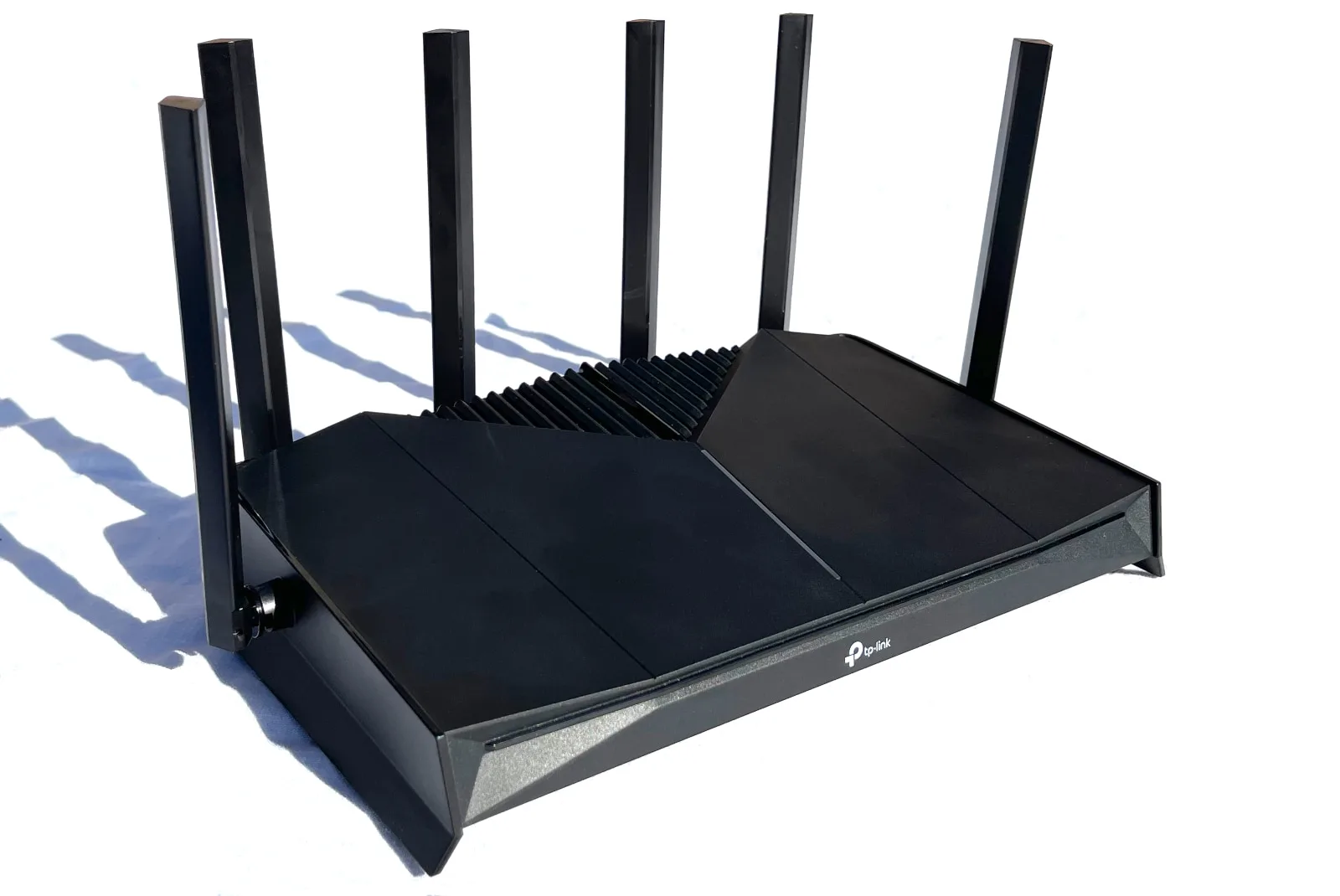
There’s a lot of bang for your buck with the TP-Link Archer GE400, including great 5 GHz speeds. Kevin Parrish | HighSpeedInternet.com
My Archer GE400 review: The verdict
The Archer GE400 is a decent pick if you need a network upgrade but don’t have Wi-Fi 7 devices. It doesn’t include the 6 GHz band, and that’s okay. My testing shows it beams great speeds on the currently crowded 5 GHz band thanks to how Wi-Fi 7 handles interference. I say this a lot, actually, but given that my 5 GHz speeds were always trash when trying to use the faster, superwide 5 GHz channels, Wi-Fi 7 pushes right through all that junk like a snowplow in a blizzard. Okay, maybe that’s a bit of an exaggeration, but you get my drift, pun intended.
Frankly, you don’t need a lot of speed for gaming, but you need extra bandwidth for all your other active and passive devices that leech your internet connection while you play. The WAN port limits your internet connection to just over 2,300Mbps, so this router isn’t ideal if you have a faster internet plan. Still, you can download a 100GB game in six minutes over a wired connection if you have the internet plan to match. W00T.
So, is this router the best for gaming? As I’ve said, a lot of the features labeled as “gaming” are just rebranded ones you probably already use: Quality of Service (QoS), device priority, and so on. The port forwarding profiles are helpful if you don’t want to look for the info on the internet, and the LED strip is neat to have. But you may want to look elsewhere if you’re looking for a gaming router loaded with unique features and more speed.
FAQ about the Archer GE400
Can this router really transmit data across multiple bands?
What gaming tools are available on the Archer GE400?
My methodology
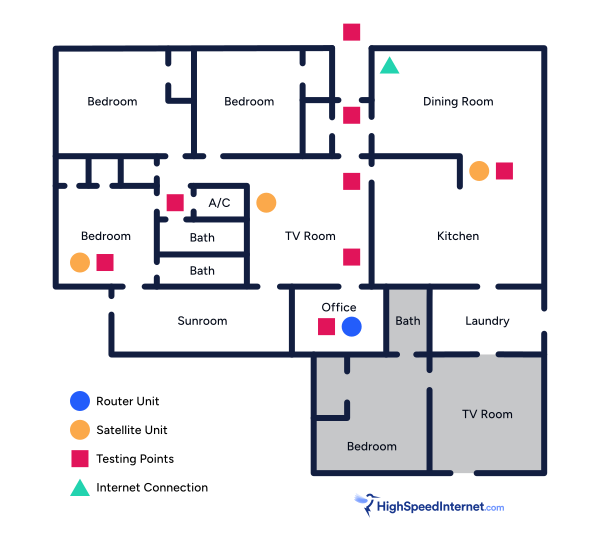
I benchmark a standalone router or mesh system by setting it up in my office and connecting it to a local server running speed test software. By using my own local server and software, I can control the input versus relying on fluctuating speeds caused by the connection between me and a remote test server. Routers aren’t internet equipment, so I exclude the internet from testing.
Once I connect the router or first mesh system unit to my local server, I transmit test data between my wireless devices and the server, taking numerous measurements to account for signal degradation, interference, and fluctuations. Here’s the testing path:
Wi-Fi client → router → local wired server → router → Wi-Fi client
The first tests occur close to the router or mesh system node wired to the test server, without obstructions, to get the strongest signal and record the fastest speed possible.
After that, I repeat the process straight out at 10, 20, and 30 feet, with only a glass door obstructing my view of the router.
Next, I go outside and run the speed test from the sidewalk (40 feet) and across the street (120 feet). The same glass door and an exterior door block my path when I run these tests.
Finally, I come back inside and run tests in a hallway to the left of the TV room and office, where a glass door, three walls, and an air handler unit block my view of the router. The dining room, another testing point, sits to the right of the kitchen, TV room, and office—two walls and a glass door block the path in this test.
Client devices used in testing
| OnePlus 11 5G | Google Pixel 6 | |
|---|---|---|
| Wi-Fi version | Wi-Fi 7 | Wi-Fi 6E |
| Stream configuration | 2 x 2 | 2 x 2 |
| Max channel width | 320 MHz | 160 MHz |
| Max 6 GHz speed (BE) | 5,764Mbps | – |
| Max 6 GHz speed (AXE) | – | 2,402Mbps |
| Max 5 GHz speed (BE) | 2,882Mbps | – |
| Max 5 GHz speed (AX) | 2,402Mbps | 2,402Mbps |
| Max 5 GHz speed (AC) | 866Mbps | 866Mbps |
| Max 2.4 GHz speed (BE) | 688Mbps | – |
| Max 2.4 GHz speed (AX) | 574Mbps | 286Mbps |
| Max 2.4 GHz speed (N) | 144Mbps | 144Mbps |
Archer GE400 benchmarks
5 GHz tests
| OnePlus 11 5G* | Google Pixel 6† | |
|---|---|---|
| 2 feet | 2,242 | 1,925 |
| 10 feet | 2,099 | 1,854 |
| 20 feet | 1,953 | 1,771 |
| 30 feet | 1,854 | 1,665 |
| 40 feet (porch) | 1,581 | 1,347 |
| 120 feet (across street) | 964 | 912 |
| 160 feet (mailboxes) | No connection | No connection |
| 20 feet (hallway) | 1,517 | 1,301 |
* Speeds in megabits per second (Mbps) using a 160 MHz channel width and a 2,882Mbps starting link rate.
† Speeds in megabits per second (Mbps) using a 160 MHz channel width and a 2,402Mbps starting link rate.
Subscription information
Here are detailed lists of the parental control and security features that are included with your purchase or made available through a subscription.
Parental controls
Here are all the free and optional premium features:
| Feature | Plan |
|---|---|
| Pause the Internet | Basic |
| Block Specific Websites | Basic |
| Filter Websites (By Category) | Basic |
| SafeSearch | Advanced Parental Controls |
| YouTube Restricted Mode | Advanced Parental Controls |
| Flexible Bedtime | Advanced Parental Controls |
| Offtime Control | Advanced Parental Controls |
| Time Limits | Advanced Parental Controls |
| Time Rewards | Advanced Parental Controls |
| Comprehensive Insights | Advanced Parental Controls |
| Detailed Reports | Advanced Parental Controls |
Basic: Included with router purchase
Advanced Parental Controls: $2.99/mo. or $17.99/yr. (all parental controls)
Security
Here are all the free and optional premium features:
| Feature | Plan |
|---|---|
| New Device Alert | Basic |
| Router Security Scan | Basic |
| Wireless Security Scan | Basic |
| Web Protection | Security+ |
| Intrusion Prevention | Security+ |
| IoT Protection | Security+ |
| Comprehensive Reports | Security+ |
| Antivirus Protection | Total Security Package |
| Unlimited VPN | Total Security Package |
| Password Management | Total Security Package |
| ID Monitoring | Total Security Package |
Basic: Included with router purchase
Security+: $4.99/mo. or $35.99/yr. (Basic + Security+ features)
Total Security Package: $69.99/yr. (all security features)
Disclaimers
Amazon
Amazon.com Prices as of 1/12/26 17:35 MST. Product prices and availability are accurate as of the date/time indicated and are subject to change. Any price and availability information displayed on Amazon.com at the time of purchase will apply to the purchase of this product. Highspeedinternet.com utilizes paid Amazon links.
CERTAIN CONTENT THAT APPEARS ON THIS SITE COMES FROM AMAZON. THIS CONTENT IS PROVIDED ‘AS IS’ AND IS SUBJECT TO CHANGE OR REMOVAL AT ANY TIME.
Author - Kevin Parrish
Kevin Parrish has more than a decade of experience working as a writer, editor, and product tester. He began writing about computer hardware and soon branched out to other devices and services such as networking equipment, phones and tablets, game consoles, and other internet-connected devices. His work has appeared in Tom’s Hardware, Tom's Guide, Maximum PC, Digital Trends, Android Authority, How-To Geek, Lifewire, and others. At HighSpeedInternet.com, he focuses on network equipment testing and review.
Editor - Jessica Brooksby
Jessica loves bringing her passion for the written word and her love of tech into one space at HighSpeedInternet.com. She works with the team’s writers to revise strong, user-focused content so every reader can find the tech that works for them. Jessica has a bachelor’s degree in English from Utah Valley University and seven years of creative and editorial experience. Outside of work, she spends her time gaming, reading, painting, and buying an excessive amount of Legend of Zelda merchandise.
Related Posts