Is AT&T Internet Down?
Find out if you're in an AT&T outage, and get tips on getting back online fast

Mar 17, 2026 | Share 


Brand Guides, Equipment Guides, Internet Outage
If AT&T is your internet provider and you’re having trouble connecting, start with an internet speed test to see if you’re in an outage.
First, reconnect to your AT&T Wi-Fi. Then, click below.
Download speed
000 Mbps
Upload speed
000 Mbps
Latency (ping)
00 ms
Jitter
00 ms
What to look for in your speed test results
If you’re in an AT&T outage, the speed test will say “Loading,” and a light blue circle will spin, but you won’t get any results.
If you get results that show download speeds, upload speeds, and latency, though, you aren’t in an outage.
You could still be having problems, of course. Ideally, you should get speeds reasonably close to what your plan promises, but you need the following for a healthy fiber or fixed wireless connection:
- Download speeds of at least 20Mbps
- Upload speeds of at least 5Mbps
- Latency of less than 100 ms
In this guide:
Troubleshoot | Get a refund | Leave a review | Decide whether to switch | My take | FAQs
In this guide:
How to troubleshoot AT&T connection issues
If you get stuck on “Loading” on the speed test above, go through the steps below.
Step 1: Check other sites, apps, and devices. If you get a connection error message on a particular website, try navigating to another site. If you get the same message, try using a different browser.
Step 2: Check the lights on your equipment to make sure everything’s plugged in and getting a signal.
Step 3: Reset or power cycle your router or gateway.
Step 4: Check your Smart Home Manager app or att.com/outages for reported outages. If you don’t see any, tap the Chat button toward the bottom of the page. The chatbot will always ask you to sign in, so it’s a good idea to have your account info and password handy.
Check the lights on your gateway
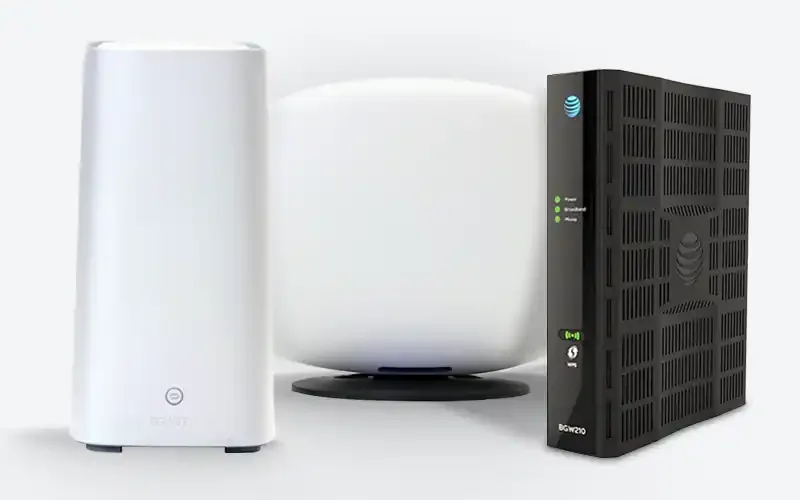
The type of router or gateway you have from AT&T depends on your internet service type. Source: AT&T
To determine whether the problem is your home network or your connection to the internet itself, take a look at the lights on your modem and router (or gateway). What to look for depends on your internet technology type and Wi-Fi equipment.
- AT&T All-Fi Hub for AT&T Air: Your internet is working if all you see is the digital clock. A red light alongside the clocks means setup or connection has failed. Green or yellow lights mean a process (such as setup or a speed test) is happening in the background.
- Wi-Fi gateway and ONT for AT&T Fiber: Green or yellow lights mean the system is setting up, and a red light means the connection has failed. Use your Smart Home Manager app to troubleshoot.
- AT&T DSL equipment: AT&T no longer sells DSL connections to new subscribers, but there’s a chance you have an older AT&T DSL system in your home. If you rent a NETGEAR DSL Gateway Model 7550 for Wi-Fi, it’s fully supported by AT&T. If you’re having issues, we recommend calling +1-800-288-2020 for support.
Learn more and troubleshoot your AT&T connection
Still can’t get online? Contact AT&T
If you can’t get online with AT&T and can’t figure out why, reach out to customer service. You can message the company online or try calling +1-800-288-2020. If you’re having trouble with your AT&T mobile phone instead of home internet, visit AT&T Wireless support or call +1-800-331-0500.
Does AT&T offer refunds?
AT&T’s terms of service say it “does not guarantee performance of your service on an end-to-end basis.” In other words, it’s not legally required to give refunds in case of an internet outage.
However, AT&T does have a history of offering outage-related refunds. After a major national outage in February 2024, for example, the company volunteered to give impacted customers $5 each. If you were one of those customers, you should have gotten a notification from AT&T.
If you have any other outages, it’s probably worth calling AT&T once your service is back up to see if you can get a credit on your bill.
Leave a review about your AT&T service
Are you an AT&T customer? We would love to hear about your experience. We rely on your input to give the best possible tech advice to readers like you.
How AT&T compares
AT&T offers internet in California, Texas, and states throughout the South and Midwest. We crunched the numbers to find its biggest direct competitors across the country. Then, we made some friendly calls on which internet provider we’d favor in a broadband battle. Let’s get into it:
AT&T vs. T-Mobile Home Internet: If you can get fiber internet from either T-Mobile or AT&T, go with it. But if all you can get from either is 5G home internet, go with T-Mobile Home Internet. It performed better in our testing, and you can save money if you bundle with T-Mobile Wireless.
AT&T vs. Spectrum Internet: The choice between AT&T and Spectrum Internet depends on which connection types are available in your neighborhood. If you can get AT&T Fiber, we think you’ll be happy with it long-term. If you can get only AT&T Air where you live, Spectrum’s cable internet might be the better choice. Just watch out for second-year price hikes, fees for equipment rental, and a Wi-Fi access fee on your monthly bill (that’s what Spectrum calls its equipment rental charge).
AT&T vs. Verizon 5G: Both AT&T and Verizon have mobile phone service, fixed wireless home internet, DSL service, and fiber. If you can get fiber internet from either provider, go for it! If you’re stuck choosing between Verizon and AT&T for fixed wireless, go with your mobile phone provider.
AT&T vs. Xfinity: It’s a close call between Xfinity cable internet and AT&T Fiber internet. If you can choose between the two and you’re not a heavy internet user, go with Xfinity because it offers cheaper plans. Just watch your data budget: If you use too much in any given month, you’ll get a warning. If you go over again the next month, you’ll be charged.

Tired of slowdowns and outages with AT&T?
Enter your zip code to find other home internet providers where you live.
My take: Serious internet customers need AT&T Fiber
AT&T Fiber is usually the fastest internet service in areas where it’s available, and you should probably stick with it if it’s already installed at your home. Fiber internet is the best option when you’re working from home, studying from home, or doing any kind of gaming. If you’re having trouble, reach out to customer service.
If you’re having trouble with your AT&T Air service, on the other hand, consider switching to cable internet or trying a 5G option from Verizon or T-Mobile.
Read more about AT&T
FAQ about AT&T
How can I report an AT&T internet outage?
How do I know if AT&T is down in my area?
How long do AT&T internet outages last?
Author - Chili Palmer
Chili Palmer covers home tech services, with a special focus on understanding what families need and how they can stay connected on a budget. She handles internet access and affordability, breaking news, mobile services, and consumer trends. Chili’s work as a writer, reporter, and editor has appeared in publications including Telecompetitor, Utah Business, Idaho Business Review, Benton Institute for Broadband & Society, and Switchful.com.
Editor - Jessica Brooksby
Jessica loves bringing her passion for the written word and her love of tech into one space at HighSpeedInternet.com. She works with the team’s writers to revise strong, user-focused content so every reader can find the tech that works for them. Jessica has a bachelor’s degree in English from Utah Valley University and seven years of creative and editorial experience. Outside of work, she spends her time gaming, reading, painting, and buying an excessive amount of Legend of Zelda merchandise.
Related Posts