Is Spectrum Internet Down?
Find out if you're in a Spectrum outage, and get tips on getting back online fast

Mar 20, 2026 | Share 


Brand Guides, Equipment Guides, Internet Outage
If Spectrum is your internet provider and you’re having trouble connecting, start with a speed test to see if you’re in an outage.
First, reconnect to your Spectrum Wi-Fi. Then, click below.
Download speed
000 Mbps
Upload speed
000 Mbps
Latency (ping)
00 ms
Jitter
00 ms
What to look for in your speed test results
If you’re in a Spectrum outage, the speed test will say “Loading,” and a light blue circle will spin, but you won’t get any results.
If you get results that show download speeds, upload speeds, and latency, though, you aren’t in an outage.
You could still be having problems, of course. Ideally, you should get speeds reasonably close to what your plan promises, but you need the following for a healthy fiber or fixed wireless connection:
- Download speeds of at least 20Mbps
- Upload speeds of at least 5Mbps
- Latency of less than 100 ms
In this guide:
Troubleshoot | Get a refund | Leave a review | Decide whether to switch | My take | FAQs
In this guide:
How to troubleshoot Spectrum connection issues
If you get stuck on “Loading” on the speed test above, go through the steps below one by one.
Step 1: Check your Spectrum wireless gateway (router + modem). A solid white light means you’re connected, a blinking white light means the system is setting up, and an amber or red light means no connection.
Step 2: Check your Ethernet and power cables to make sure they are connected securely and haven’t been damaged.
Step 3: Try logging into your Spectrum network with a different device, such as a gaming console, smart TV, or smartphone. Try both Wi-Fi and Ethernet connections.
Step 4: Restart (or unplug and reboot) your affected devices and your gateway. A full reboot usually takes about 10 minutes.
Step 5: Check your My Spectrum app or Spectrum account for any outage-related notifications.
Check the lights on your router
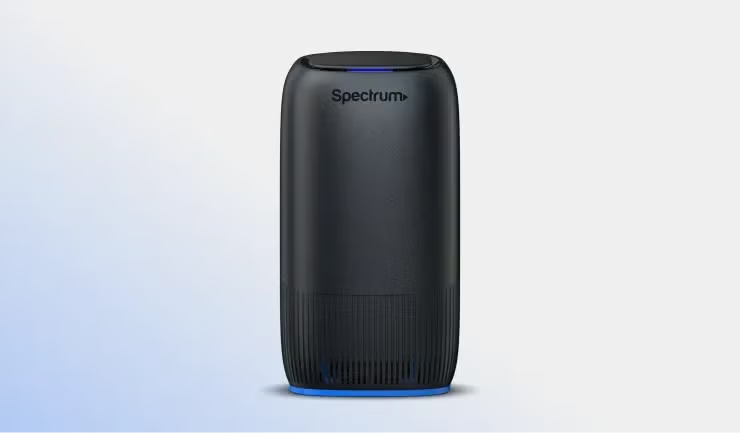
Spectrum’s Advanced WiFi internet router with a steady blue light showing a stable internet connection. Source: Spectrum
Spectrum offers a variety of internet gateway models, and yours will depend on your plan and when you signed up. For most models, a steady blue light means you’re connected to the internet, while flashing blue means setup is underway. A red light means you don’t have an internet connection, and no light means you aren’t connected to power.
Learn more and troubleshoot your Spectrum connection
Still can’t get online? Contact Spectrum
If you still can’t get online, it’s time to contact Spectrum support. You’ll need the phone number of the account holder or your Spectrum account number. You can find that number at the top left corner of your printed bill or the top right corner of our account page online.
In the My Spectrum app, tap Your Account in the top-right corner of the home screen, and then tap View Account Info.
Does Spectrum offer refunds?
Spectrum doesn’t offer automatic refunds to home internet customers, but you may be able to ask for a refund if you’ve had a lot of problems.
Here’s the official policy, according to the terms of service: “Spectrum may give credit with respect to Subscriber’s recurring monthly subscription fee for qualifying outages.” But Spectrum maintains it isn’t required to do so.
Leave a review about your Spectrum service
If you’re a Spectrum customer, we want to hear from you! Your honest reviews help us give better advice to other customers looking for great home internet. Once you’re done, check out what other Spectrum customers have to say.
How Spectrum compares
Spectrum offers service in states and cities throughout the country, so it competes with dozens of internet providers. Here’s a look at what to expect if you’re thinking of switching:
Spectrum vs. AT&T: AT&T offers both 5G and fiber internet service, depending on your address. If you can get AT&T Fiber where you live, you will usually get faster speeds at better prices than you would with Spectrum, but you may be able to find a slower budget plan from Spectrum. If only AT&T Internet Air is available, though, Spectrum’s cable internet is the better option.
Spectrum vs. Verizon: Verizon also offers both 5G home internet and fiber internet under the brand name Verizon Fios. In terms of speed and reliability, choose fiber first, then cable, then 5G home internet. If you don’t use the internet much but still need a home internet service, though, you might be able to save by bundling Verizon’s 5G fixed wireless offering with your Verizon mobile phone bill.
Spectrum vs. T-Mobile 5G Home Internet: If you have a choice of either T-Mobile or Spectrum, you’re probably looking at cable vs. fixed wireless internet. While cable is still usually your best option, T-Mobile’s 5G home internet has a solid reputation. You get the best deals when you bundle with mobile.

Tired of slowdowns and outages with Spectrum?
Enter your zip code to find other home internet providers where you live.
My take: Troubleshoot, then shop Spectrum alternatives
Spectrum offers solid cable internet service, and cable internet may be the most reliable internet option you have at your address. However, 5G home internet is getting better all the time, and providers nationwide have been building out fiber internet infrastructure.
We recommend Spectrum often, and encourage you to contact the company to troubleshoot before you jump ship. That said, we also recommend shopping for a new internet provider about once a year.
Who knows, you might have more options than you thought! Learn how to switch internet providers in five easy steps.
Read more about Spectrum
Spectrum outage FAQ
How do I know if Spectrum is down in my area?
Why isn't my Spectrum Internet working?
How do I check my Spectrum signal?
Why is my Spectrum Wi-Fi connected, but I don't have internet?
Does Spectrum work when the power is out?
Author - Chili Palmer
Chili Palmer covers home tech services, with a special focus on understanding what families need and how they can stay connected on a budget. She handles internet access and affordability, breaking news, mobile services, and consumer trends. Chili’s work as a writer, reporter, and editor has appeared in publications including Telecompetitor, Utah Business, Idaho Business Review, Benton Institute for Broadband & Society, and Switchful.com.
Editor - Jessica Brooksby
Jessica loves bringing her passion for the written word and her love of tech into one space at HighSpeedInternet.com. She works with the team’s writers to revise strong, user-focused content so every reader can find the tech that works for them. Jessica has a bachelor’s degree in English from Utah Valley University and seven years of creative and editorial experience. Outside of work, she spends her time gaming, reading, painting, and buying an excessive amount of Legend of Zelda merchandise.
Related Posts